Tutorial
Graphix provides a high-level interface to generate, optimize and classically simulate the measurement-based quantum computing (MBQC).
In this tutorial, we look at how to program MBQC using graphix library. We will explain the basics here along with the code, and you can go to Introduction to MBQC to learn more about the theoretical background of MBQC and Module reference for module references.
Generating measurement patterns
Graphix is centered around the measurement pattern, which is a sequence of commands such as qubit preparation, entanglement and single-qubit measurement commands. The most basic measurement pattern is that for realizing Hadamard gate, which we will use to see how graphix works.
First, install graphix by
>>> pip install graphix
For any gate network, we can use the Circuit class to generate the measurement pattern to realize the unitary evolution.
from graphix.transpiler import Circuit
# apply H gate to a qubit in + state
circuit = Circuit(1)
circuit.h(0)
pattern = circuit.transpile().pattern
the Pattern object contains the sequence of commands according to the measurement calculus framework [1].
Let us print the pattern (command sequence) that we generated,
>>> pattern
Pattern(input_nodes=[0], cmds=[N(1), E((0, 1)), M(0), X(1, {0})], output_nodes=[1])
The command sequence represents the following sequence:
starting with an input qubit \(|\psi_{in}\rangle_0\), we first prepare an ancilla qubit \(|+\rangle_1\) with N(1) command
We then apply CZ-gate by E((0, 1)) command to create entanglement.
We measure the qubit 0 in Pauli X basis, by M(0) command.
If the measurement outcome is \(s_0 = 1\) (i.e. if the qubit is projected to \(|-\rangle\), the Pauli X eigenstate with eigenvalue of \((-1)^{s_0} = -1\)), the ‘X’ command is applied to qubit 1 to ‘correct’ the measurement byproduct (see Introduction to MBQC) that ensure deterministic computation.
Tracing out the qubit 0 (since the measurement is destructive), we have \(H|\psi_{in}\rangle_1\) - the input qubit has teleported to qubit 1, while being transformed by Hadamard gate.
This MBQC pattern sequence uses a resource state as shown below:
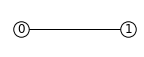
This is the simplest of the graph state with nodes = [0, 1] and edge = (0, 1). Any MBQC pattern has a corresponding resource graph state on which the computation occurs only with single-qubit measurements.
We can use the PatternSimulator to classically simulate the pattern above and obtain the output state, for default input state of \(|+\rangle\).
Alternatively, we can simply call simulate_pattern() of Pattern object to do it in one line:
>>> print(pattern.simulate_pattern(backend='statevector'))
Statevec object with statevector [1.+0.j 0.+0.j] and length (2,).
Note again that we started with \(|+\rangle\) state so the answer is correct.
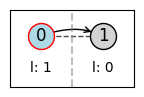
We can use the in-built visualization tool to view the pattern,
>>> pattern.draw_graph()
Universal gate sets
As a more complex example than above, we show measurement patterns and graph states for CNOT and single-qubit general rotation which makes MBQC universal:
CNOT |
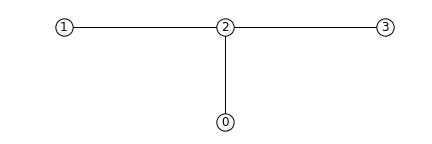
control: input=0, output=0; target: input=1, output=3¶ |
>>> cnot_pattern
Pattern(cmds=[N(0), N(1), N(2), N(3), E((1, 2)), E((0, 2)), E((2, 3)), M(1),
    M(2), X(3, {2}), Z(3, {1}), Z(0, {1})], output_nodes=[0, 3])
|
general rotation (an example with Euler angles 0.2pi, 0.15pi and 0.1 pi) |
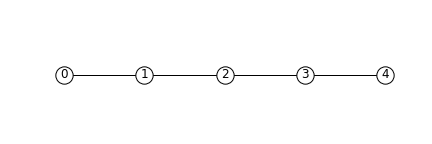
input = 0, output = 4¶ |
>>> euler_rot_pattern
 Pattern(cmds=[N(0), N(1), N(2), N(3), N(4), M(0, angle=-0.2),
     M(1, angle=-0.15, s_domain={0}), M(2, angle=-0.1, s_domain={1}),
     M(3), Z(4, domain={0, 2}), X(4, domain={1, 3})], output_nodes=[4])
|
We can concatenate these commands to perform any quantum information processing tasks, which we will look at in more detail below.
Of course, we also have many other gates that can be transpiled into MBQC; see Circuit class.
Optimizing patterns
We provide a number of optimization routines to improve the measurement pattern. As an example, let us prepare a pattern to rotate two qubits in \(|+\rangle\) with a random angle and entangle them with a CNOT gate:
from graphix.transpiler import Circuit
import numpy as np
circuit = Circuit(2) # initialize with |+> \otimes |+>
circuit.rz(0, np.random.rand())
circuit.rz(1, np.random.rand())
circuit.cnot(0, 1)
pattern = circuit.transpile().pattern
This produces a rather long and complicated command sequence.
>>> pattern
Pattern(input_nodes=[0, 1], cmds=[N(2), N(3), E((0, 2)), E((2, 3)), M(0, angle=-0.08131311068764493), M(2), X(3, {2}), Z(3, {0}), N(4), N(5), E((1, 4)), E((4, 5)), M(1, angle=-0.2242107876075538), M(4), X(5, {4}), Z(5, {1}), N(6), N(7), E((5, 6)), E((3, 6)), E((6, 7)), M(5), M(6), X(7, {6}), Z(7, {5}), Z(3, {5})], output_nodes=[3, 7])

As we see below, we can simplify and optimize the pattern by calling various methods of Pattern.
Standardization and signal shifting
The standard pattern is a pattern where the commands are sorted in the order of N, E, M, (X, Z, C) where X, Z and C commands in bracket can be in any order but must apply only to output nodes. Any command sequence has a standard form, which can be obtained by the standardization algorithm in [1] that runs in polynomial time on the number of commands.
An additional signal shifting procedure simplifies the dependence structure of the pattern to minimize the feedforward operations.
These can be called with standardize() and shift_signals() and result in a simpler pattern sequence.
>>> pattern.standardize()
>>> pattern.shift_signals()
>>> pattern
Pattern(input_nodes=[0, 1], cmds=[N(2), N(3), N(4), N(5), N(6), N(7), E((0, 2)), E((2, 3)), E((1, 4)), E((4, 5)), E((5, 6)), E((3, 6)), E((6, 7)), M(0, angle=-0.22152331776994327), M(2), M(1, angle=-0.18577010991028864), M(4), M(5, s_domain={4}), M(6), Z(3, {0, 1, 5}), Z(7, {1, 5}), X(3, {2}), X(7, {2, 4, 6})], output_nodes=[3, 7])

The command sequence is now simpler and note that the most byproduct commands now apply to output nodes (3, 7). This reveals the graph structure of the resource state which we can inspect:
import networkx as nx
graph = pattern.extract_graph()
pos = {0: (0, 0), 1: (0, -0.5), 2: (1, 0), 3: (4, 0), 4: (1, -0.5), 5: (2, -0.5), 6: (3, -0.5), 7: (4, -0.5)}
graph_params = {'node_size': 240, 'node_color': 'w', 'edgecolors': 'k', 'with_labels': True}
nx.draw(graph, pos=pos, **graph_params)
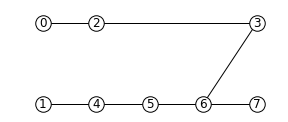
0 and 1 are the input nodes and 3 and 7 are the output nodes of this graph.
Performing Pauli measurements
It is known that quantum circuit consisting of Pauli basis states, Clifford gates and Pauli measurements can be simulated classically (see Gottesman-Knill theorem; e.g. the graph state simulator runs in \(\mathcal{O}(n \log n)\) time).
The Pauli measurement part of the MBQC is exactly this, and they can be preprocessed by our graph state simulator GraphState - see Introduction to LC-MBQC for more detailed description.
We can call this in a line by calling remove_input_nodes() followed by perform_pauli_measurements() (both methods of the Pattern object). The first method removes the input nodes, while the second method optimizes the measurement pattern.
We get an updated measurement pattern without Pauli measurements as follows:
>>> pattern.remove_input_nodes()
>>> pattern.perform_pauli_measurements()
>>> pattern
Pattern(input_nodes=[], cmds=[N(0), N(1), N(3), N(7), E((0, 3)), E((1, 3)), E((1, 7)), M(0, Plane.YZ, 0.2907266109187514), M(1, Plane.YZ, 0.01258854060311348), C(3, Clifford.I), C(7, Clifford.I), Z(3, {0, 1, 5}), Z(7, {1, 5}), X(3, {2}), X(7, {2, 4, 6})], output_nodes=[3, 7])
Notice that all measurements with angle=0 (Pauli X measurements) disappeared - this means that a part of quantum computation was classically (and efficiently) preprocessed such that we only need much smaller quantum resource. The additional Clifford commands, along with byproduct operations, can be dealt with by simply rotating the final readout measurements from the standard Z basis, so there is no downside in doing this preprocessing.
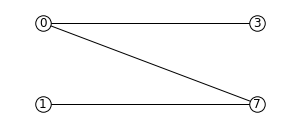
As you can see below, the resource state has shrank significantly (factor of two reduction in the number of nodes), but again we know that they both serve as the quantum resource state for the same quantum computation task as defined above.
before |
after |
|---|---|
|
|
|
As we mention in Introduction to MBQC, all Clifford gates translates into MBQC only consisting of Pauli measurements. So this procedure is equivalent to classically preprocessing all Clifford operations from quantum algorithms.
Minimizing ‘space’ of a pattern
The space of a pattern is the largest number of qubits that must be present in the graph state during the execution of the pattern.
For standard patterns, this is exactly the size of the resource graph state, since we prepare all ancilla qubits at the start of the computation.
However, we do not always need to prepare all qubits at the start; in fact preparing all the adjacent (connected) qubits of the ones that you are about measure, is sufficient to run MBQC.
We exploit this fact to minimize the space of the pattern, which is crucial for running statevector simulation of MBQC since they are typically limited by the available computer memory.
We can simply call minimize_space() to reduce the space:
>>> pattern.minimize_space()
>>> pattern
Pattern(input_nodes=[], cmds=[N(0), N(1), N(3), E((0, 3)), M(0, Plane.YZ, 0.11120090987081546), E((1, 3)), N(7), E((1, 7)), M(1, Plane.YZ, 0.230565199664617), C(3, Clifford.I), C(7, Clifford.I), Z(3, {0, 1, 5}), Z(7, {1, 5}), X(3, {2}), X(7, {2, 4, 6})], output_nodes=[3, 7])
With the original measurement pattern, the simulation should have proceeded as follows, with maximum of four qubits on the memory.

With the optimization with minimize_space(), the simulation proceeds as below, where we measure and trace out qubit 1 before preparing qubits 0 and 3.
Because the graph state only has short-range correlations (only adjacent qubits are entangled), this does not affect the outcome of the computation.
With this, we only need the memory space for three qubits.

This procedure is more effective when the resource state size is large compared to the logical input qubit count;
for example, the three-qubit quantum Fourier transform (QFT) circuit requires 12 qubits in the resource state after perform_pauli_measurements() (see the code in QFT example); with the proper reordering of the commands, the max_space reduces to 4.
In fact, for patterns transpiled from gate network, the minimum space we can realize is typically \(n_w+1\) where \(n_w\) is the width of the circuit.
Simulating noisy MBQC
We can simulate the MBQC pattern with various noise models to understand their effects. The pattern that we used above can be simulated with the statevector backend.
out_state = pattern.simulate_pattern(backend="statevector")
The statevector backend simulates the pattern ideally, without any noise.
To run noisy simulations, we use a NoiseModel, which transpiles ideal patterns into patterns containing some ApplyNoise commands.
Each ApplyNoise command applies noise to certain qubits. The noise to be applied is described by an instance of Noise, which is an abstract base class for classes that define a Kraus channel.
In the following example, we apply dephasing noise to qubit preparation commands (denoted by N) by defining a noise model, NoisyGraphState, that transpiles ideal patterns by inserting an ApplyNoise command carrying a DephasingNoise after each N command.
from dataclasses import dataclass
from typing import Iterable
import typing_extensions
from graphix.command import BaseM, CommandKind
from graphix.channels import KrausChannel, dephasing_channel
from graphix.noise_models.noise_model import ApplyNoise, CommandOrNoise, Noise, NoiseCommands, NoiseModel
from graphix.utils import Probability

@dataclass
class DephasingNoise(Noise):
    prob: Probability = Probability()

    @property
    @typing_extensions.override
    def nqubits(self) -> int:
        return 1

    @typing_extensions.override
    def to_kraus_channel(self) -> KrausChannel:
        return dephasing_channel(self.prob)

@dataclass
class NoisyGraphState(NoiseModel):
    p_z: Probability = Probability()

    @typing_extensions.override
    def input_nodes(self, nodes: Iterable[int]) -> NoiseCommands:
        """Return the noise to apply to input nodes."""
        return []

    @typing_extensions.override
    def command(self, cmd: CommandOrNoise) -> NoiseCommands:
        """Return the noise to apply to the command `cmd`."""
        if cmd.kind == CommandKind.N:
            return [cmd, ApplyNoise(noise=DephasingNoise(self.p_z), nodes=[cmd.node])]
        else:
            return [cmd]

    @typing_extensions.override
    def confuse_result(self, cmd: BaseM, result: bool) -> bool:
        """Assign wrong measurement result."""
        return result
With the noise model written, we can simulate it.
from graphix.simulator import PatternSimulator

simulator = PatternSimulator(pattern, backend="densitymatrix", noise_model=NoisyGraphState(p_z=0.01))
dm_result = simulator.run()
>>> print(dm_result.fidelity(out_state.psi.flatten()))
0.9718678141724848
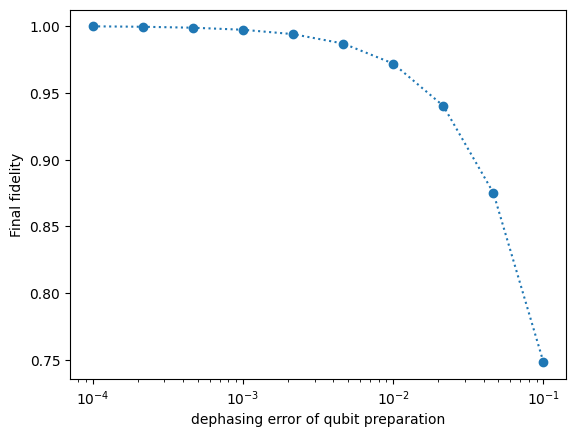
We can plot the results from the model,
import matplotlib.pyplot as plt

err_arr = np.logspace(-4, -1, 10)
fidelity = np.zeros(10)
for i in range(10):
    simulator = PatternSimulator(pattern, backend="densitymatrix", noise_model=NoisyGraphState(p_z=err_arr[i]))
    dm_result = simulator.run()
    fidelity[i] = dm_result.fidelity(out_state.psi.flatten())

plt.semilogx(err_arr, fidelity, "o:")
plt.xlabel("dephasing error of qubit preparation")
plt.ylabel("Final fidelity")
plt.show()
Running pattern on quantum devices
We are currently adding cloud-based quantum devices to run MBQC pattern. Our first such interface is for IBMQ devices, and is available as graphix-ibmq module.
First, install graphix-ibmq by
>>> pip install graphix-ibmq
With graphix-ibmq installed, we can turn a measurement pattern into a qiskit dynamic circuit.
from graphix_ibmq.backend import IBMQBackend

# minimize space and convert to qiskit circuit
pattern.minimize_space()
backend = IBMQBackend()
backend.compile(pattern)
print(type(backend._compiled_circuit))

# select device and submit job
backend.select_device()
job = backend.submit_job(shots=1024)
<class 'qiskit.circuit.quantumcircuit.QuantumCircuit'>
This can be run on Aer simulator or IBMQ devices. See documentation page for graphix-ibmq interface for more details, as well as a detailed example showing how to run pattern on IBMQ devices.
Generating QASM file
For other systems, we can generate QASM3 instruction set corresponding to the pattern, following
qasm_inst = pattern.to_qasm3('pattern')
Now check the generated qasm file:
$ cat pattern.qasm
// generated by graphix
OPENQASM 3;
include "stdgates.inc";

// measurement result of qubit q2
bit c2 = 0;

// measurement result of qubit q4
bit c4 = 0;

// measurement result of qubit q5
bit c5 = 0;

// measurement result of qubit q6
bit c6 = 0;

// prepare qubit q3
qubit q3;
h q3;

// entangle qubit q0 and q3
cz q0, q3;

// measure qubit q0
bit c0;
float theta0 = 0;
p(-theta0) q0;
h q0;
c0 = measure q0;
h q0;
p(theta0) q0;

...