Note
Go to the end to download the full example code.
Designing fusion network to generate resource graph state
In this example, we decompose a graph state into a set of GHZ and linear cluster resource states, such that fusion operations can be used on these ‘micro-resource’ states to obtain the desired graph state. This is an important compilation stage to perform MBQC on discrete-variable optical QPUs.
The decomposition algorithm is based on [1].
[1] Zilk et al., A compiler for universal photonic quantum computers, 2022 arXiv:2210.09251
from __future__ import annotations

import itertools

import graphix
from graphix import extraction
from graphix.extraction import get_fusion_network_from_graph
Here we say we want a graph state with 9 nodes and 12 edges.
We can obtain resource graph for a measurement pattern by using nodes, edges = pattern.get_graph().
gs = graphix.GraphState()
nodes = [0, 1, 2, 3, 4, 5, 6, 7, 8]
edges = [(0, 1), (1, 2), (2, 3), (3, 0), (3, 4), (0, 5), (4, 5), (5, 6), (6, 7), (7, 0), (7, 8), (8, 1)]
gs.add_nodes_from(nodes)
gs.add_edges_from(edges)
gs.draw()
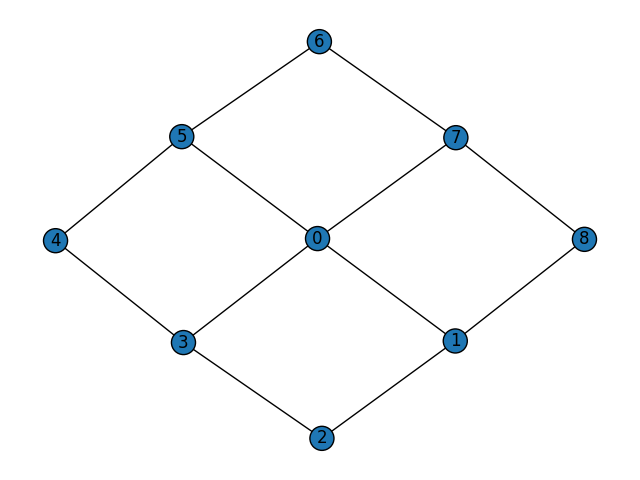
Decomposition with GHZ and linear cluster resource states with no limitation in their sizes.
get_fusion_network_from_graph(gs)
[ResourceGraph(cltype=<ResourceType.GHZ: 'GHZ'>, graph=<graphix.graphsim.GraphState object at 0x79ac56230cd0>), ResourceGraph(cltype=<ResourceType.GHZ: 'GHZ'>, graph=<graphix.graphsim.GraphState object at 0x79ac56230ed0>), ResourceGraph(cltype=<ResourceType.LINEAR: 'LINEAR'>, graph=<graphix.graphsim.GraphState object at 0x79ac5644dad0>)]
If you want to know what nodes are fused in each resource states,
you can use get_fusion_nodes() function.
Currently, we consider only type-I fusion. See [2] for the definition of fusion.
[2] Daniel E. Browne and Terry Rudolph. Resource-efficient linear optical quantum computation. Physical Review Letters, 95(1):010501, 2005.
fused_graphs = get_fusion_network_from_graph(gs)
for idx1, idx2 in itertools.combinations(range(len(fused_graphs)), 2):
    print(
        f"fusion nodes between resource state {idx1} and "
        f"resource state {idx2}: {extraction.get_fusion_nodes(fused_graphs[idx1], fused_graphs[idx2])}"
    )
fusion nodes between resource state 0 and resource state 1: [1]
fusion nodes between resource state 0 and resource state 2: [7, 5, 3]
fusion nodes between resource state 1 and resource state 2: [2, 8]
You can also specify the maximum size of GHZ clusters and linear clusters available, for more realistic fusion scheduling.
get_fusion_network_from_graph(gs, max_ghz=4, max_lin=4)
[ResourceGraph(cltype=<ResourceType.GHZ: 'GHZ'>, graph=<graphix.graphsim.GraphState object at 0x79ac707e4e90>), ResourceGraph(cltype=<ResourceType.GHZ: 'GHZ'>, graph=<graphix.graphsim.GraphState object at 0x79ac567f3290>), ResourceGraph(cltype=<ResourceType.LINEAR: 'LINEAR'>, graph=<graphix.graphsim.GraphState object at 0x79ac5674dc90>), ResourceGraph(cltype=<ResourceType.LINEAR: 'LINEAR'>, graph=<graphix.graphsim.GraphState object at 0x79ac5674dd50>)]
Total running time of the script: (0 minutes 0.045 seconds)